> ## Documentation Index
> Fetch the complete documentation index at: https://memberful.com/docs/llms.txt
> Use this file to discover all available pages before exploring further.
# Email templates
> Edit Memberful's transactional email templates to match your brand, customize subject lines and copy, and help members complete key actions.
export const RelatedDocs = ({link1, link2, link3, link4, link5, link6, link7, link8, link9, link10, className = ""}) => {
const links = [link1, link2, link3, link4, link5, link6, link7, link8, link9, link10].filter(Boolean);
if (!links.length) return null;
return ;
};
Memberful sends transactional emails for account access, payments, subscription changes, gifts, and other member activity. You can customize these templates to match your brand and help members take the right action.
In this help article, we'll configure sending details, customize and test email templates, review available templates and variables, and access a member's email history.
## Configure sending details
In the Memberful dashboard, go to **Members** → **Settings**. Enter the name and reply-to email address to use for transactional emails, then click **Save changes**.
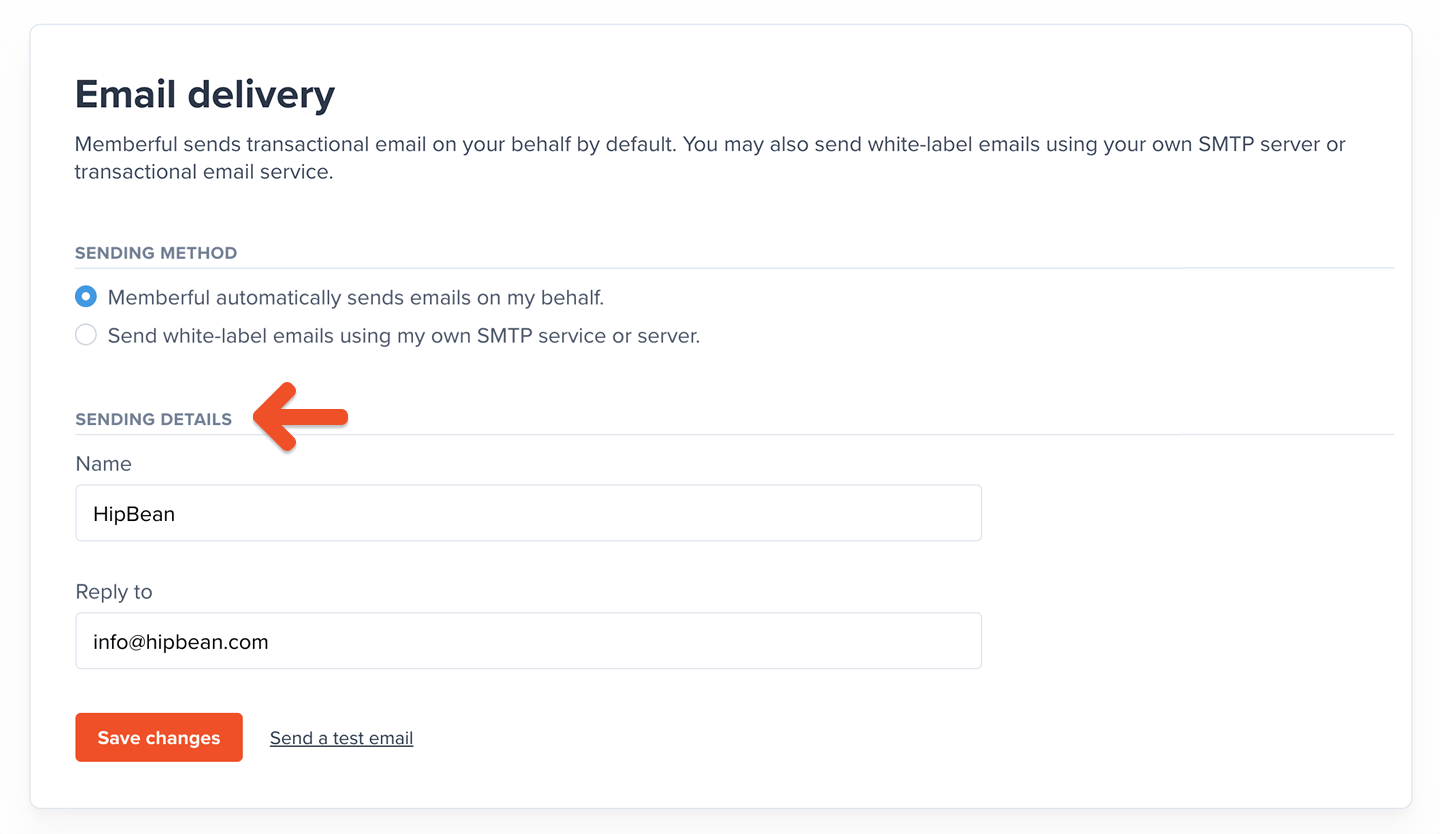 You can also send white-label emails using your own SMTP server or transactional email service. For full setup guidance, see [Send white-label transactional emails](/docs/configuration/emails/white-label-transactional-emails/).
Using a member's name encourages engagement. [Use the available variables](/docs/configuration/emails/email-templates/#review-available-variables) to personalize your emails.
## Edit the email templates
All email templates are enabled by default except *Welcome message*, *Welcome back*, and *Checking in*.
In the Memberful dashboard, go to **Members** → **Templates**.
Click the email template you want to customize.
You can also send white-label emails using your own SMTP server or transactional email service. For full setup guidance, see [Send white-label transactional emails](/docs/configuration/emails/white-label-transactional-emails/).
Using a member's name encourages engagement. [Use the available variables](/docs/configuration/emails/email-templates/#review-available-variables) to personalize your emails.
## Edit the email templates
All email templates are enabled by default except *Welcome message*, *Welcome back*, and *Checking in*.
In the Memberful dashboard, go to **Members** → **Templates**.
Click the email template you want to customize.
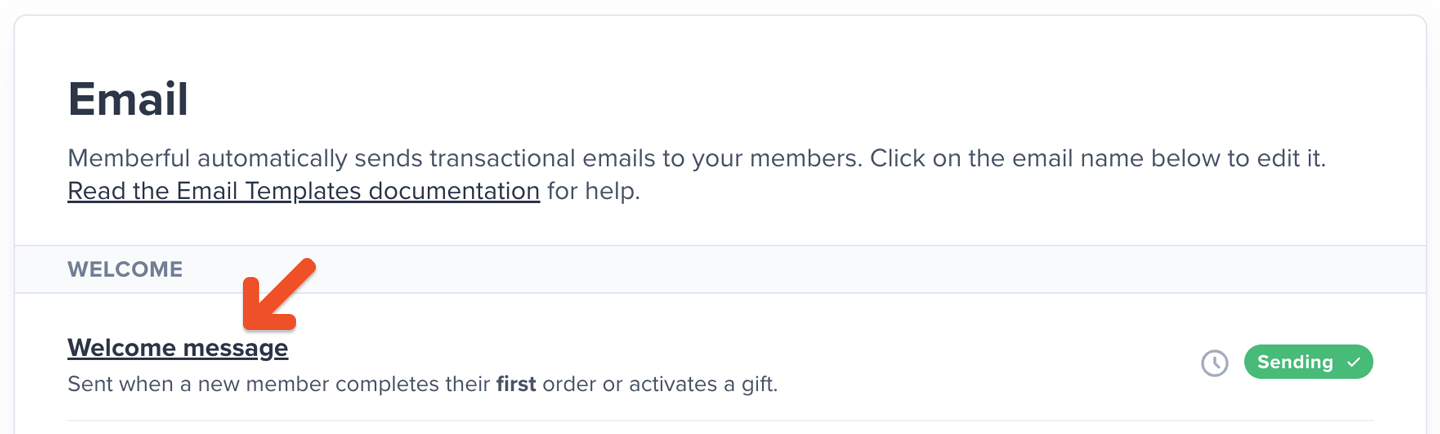 Click **Edit template**.
Edit the subject line and body. Click **Add variable** to add an [available variable](#review-available-variables) to the template. To restore the original subject line and body, click **Reset to default**.
Click **Edit template**.
Edit the subject line and body. Click **Add variable** to add an [available variable](#review-available-variables) to the template. To restore the original subject line and body, click **Reset to default**.
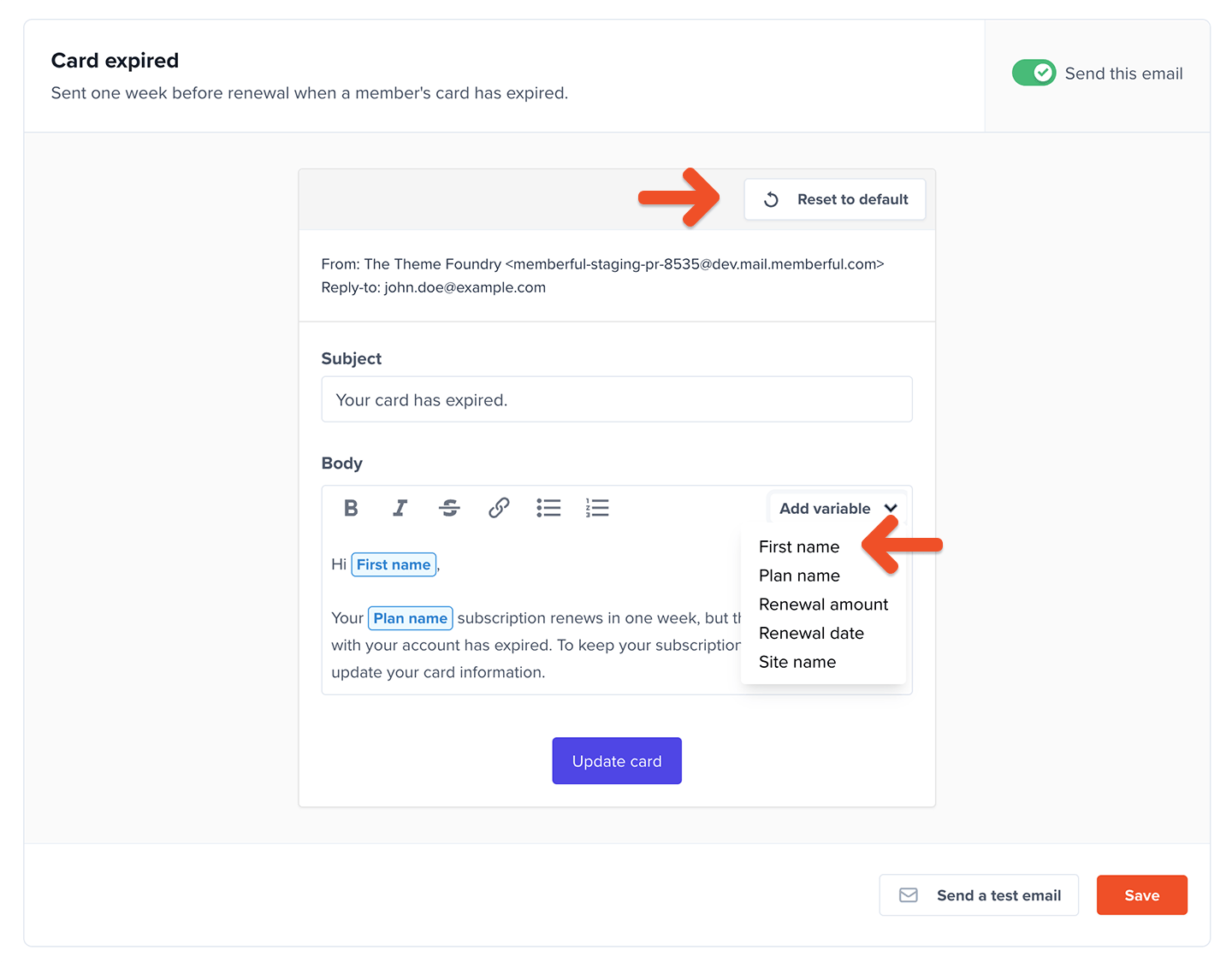 Click **Save**.
## Test the email templates
While editing a template, click **Send a test email** at the bottom of the page to send a test to yourself.
Click **Save**.
## Test the email templates
While editing a template, click **Send a test email** at the bottom of the page to send a test to yourself.
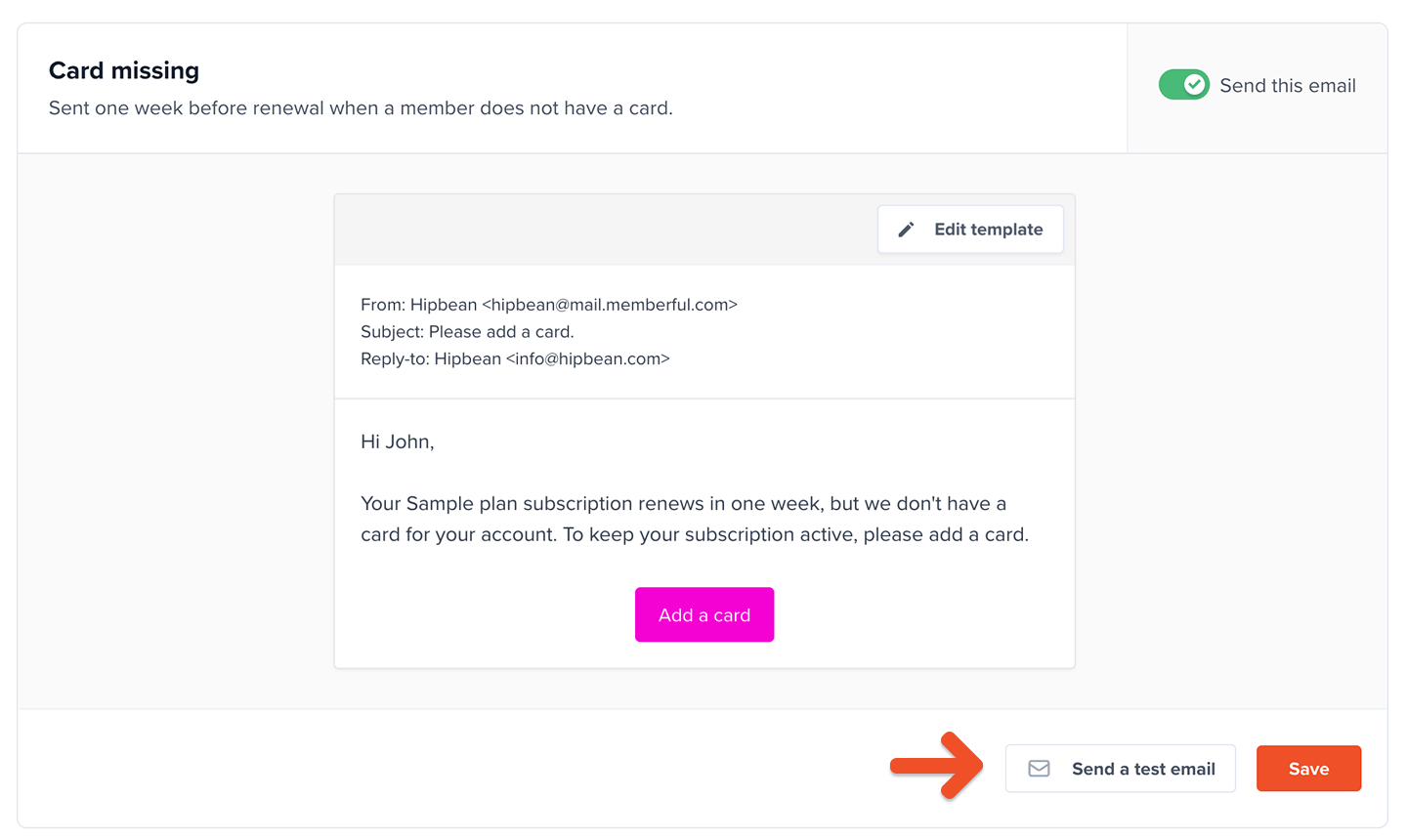 On accounts in [test mode](/docs/overview/getting-started/make-test-purchases/) without a payment method, **Send a test email** is unavailable for most templates. Memberful only sends the sign-in email, using a special template sent to the account owner, so you can test the member sign-in flow.
After you add a payment method, you can send and receive up to 25 transactional emails per day and use **Send a test email** with the other templates.
After your site is live, use a separate Memberful account in test mode or an email service to test email triggers without affecting the emails sent from your live account.
## Review available templates
**Welcome emails**
* **Welcome message:** Sent when a member or group manager completes their first order or activates a gift.
* **Welcome back:** Sent when a member reactivates an expired subscription.
* **Checking in:** Sent 14 days after a member signs up through checkout and completes their first order. Existing free members who make a purchase later will not receive this email.
* **New free member created:** Sent to new members who sign up for free or are created by staff.
* **Gift delivery:** Sent when a member receives a gift.
* **Discord invite:** Sent to new members if the Discord integration is enabled.
**Payment emails**
* **Payment receipt:** Sent whenever a member completes an order, including orders with a free trial.
* **Payment refunded:** Sent when an order is refunded.
* **Gift payment receipt:** Sent when someone buys a gift.
* **Card missing:** Sent one week before renewal when a member does not have a credit card and their subscription hasn't been canceled.
* **Card expired:** Sent one week before renewal when a member's credit card has expired and their subscription hasn't been canceled. Sent only once per card.
We send the *Card missing* and *Card expired* emails once a day at 9 AM UTC. For example, if a member signs up for a 7-day trial on March 1 at 10 AM UTC, we will have already sent the emails for the day. Once we check again on March 2, the subscription will expire in 6 days, so the member won’t be eligible to receive the emails.
The Subscription is past due template will notify members that a renewal payment failed. Specific decline reasons, such as insufficient funds or a declined card, **[are available in Stripe](/docs/member-management/payments-and-access/handle-failed-payments).** Memberful only receives whether the charge succeeded or failed.
**Subscription emails**
* **Subscription expiring soon:** Sent 48 hours before a canceled subscription expires.
* **Subscription is past due:** Sent when a subscription becomes past due.
* **Subscription expired:** Sent when a subscription has expired, including subscriptions that expired because the member didn't add a credit card before the end of a trial.
* **Subscription renewal reminder:** Sent before a subscription renews — 31 days ahead for plans of a year or longer, and 14 days ahead for plans of three to eleven months.
* **Trial ending:** If the trial requires a credit card and lasts for 7 days or longer, this email will be sent 5 days before it renews. We will stop sending this email if you edit the plan to no longer offer a trial, even if a member is currently in a trial.
**Referrals**
* **New reward:** Sent when a member earns a referral reward.
**Retention**
* **Subscription canceled:** Sent two days after a member cancels a subscription, if they are not eligible for a retention discount.
* **Retention discount:** Sent one hour after a member cancels a subscription, if they are eligible for a retention discount.
**Group subscription emails**
* **Welcome group subscription manager:** Sent to new group managers after they purchase a group subscription.
* **Welcome new group subscription member:** Sent to new members after they join a group subscription.
* **Request to join a group subscription:** Sent to group managers when a member requests approval to join a group subscription.
**Maintenance emails**
* **Sign in link:** Sent when a member requests a sign in link.
* **Create password:** Sent when a member requests to create a password.
* **Password reset:** Sent when a member has lost or forgotten their password.
## Review available variables
**Global**
Available for these templates: *Welcome message, Welcome back, Payment receipt, Payment refunded, Checking in, Password reset, New free member created, Discord invite*.
* **Site name:** The name of the site configured in **Website** → **General settings**.
* **First name:** The first name of the email recipient.
**Subscriptions**
Available for these templates: *Subscription expiring soon, Subscription is past due, Subscription expired, Card expired, Card missing, Subscription renewal reminder, Trial ending*.
* **Plan name:** The name of the subscription's plan.
* **Renewal amount:** The renewal price for the subscription.
* **Renewal date:** The renewal date for an active subscription or the expiration date for an inactive subscription.
**Gifts**
Available for these templates: *Gift delivery, Gift payment receipt*.
* **Site name**
* **Gift giver name**
* **Gift giver email**
* **Gift recipient name**
* **Gift recipient email**
**Referrals**
Available for this template: *New reward*.
* **First name**
* **Member count**
* **Plan name**
* **Renewal discount**
* **Site name**
**Retention**
Available for these templates: *Retention discount, Subscription canceled*.
* **Discount amount (Retention discount only)**
* **First name**
* **Plan name**
* **Site name**
* **Subscription duration**
* **Renewal amount (Subscription canceled only)**
* **Renewal date (Subscription canceled only)**
**Group subscriptions**
Available for these templates: *Request to join a group subscription, Welcome new group subscription member, Welcome group subscription manager*.
* **Plan name**
* **Group subscription manager name** (*Welcome new group subscription member* only)
* **Group subscription manager email** (*Welcome new group subscription member* only)
* **Group subscription member name** (*Request to join a group subscription* only)
* **Group subscription member email** (*Request to join a group subscription* only)
## View a member's email history
You can access a log of the transactional emails Memberful sends to each member. To review delivery status and troubleshoot failures, see [Access a member's email history](/docs/member-management/subscription-management/admin-member-management/#access-a-members-email-history).
On accounts in [test mode](/docs/overview/getting-started/make-test-purchases/) without a payment method, **Send a test email** is unavailable for most templates. Memberful only sends the sign-in email, using a special template sent to the account owner, so you can test the member sign-in flow.
After you add a payment method, you can send and receive up to 25 transactional emails per day and use **Send a test email** with the other templates.
After your site is live, use a separate Memberful account in test mode or an email service to test email triggers without affecting the emails sent from your live account.
## Review available templates
**Welcome emails**
* **Welcome message:** Sent when a member or group manager completes their first order or activates a gift.
* **Welcome back:** Sent when a member reactivates an expired subscription.
* **Checking in:** Sent 14 days after a member signs up through checkout and completes their first order. Existing free members who make a purchase later will not receive this email.
* **New free member created:** Sent to new members who sign up for free or are created by staff.
* **Gift delivery:** Sent when a member receives a gift.
* **Discord invite:** Sent to new members if the Discord integration is enabled.
**Payment emails**
* **Payment receipt:** Sent whenever a member completes an order, including orders with a free trial.
* **Payment refunded:** Sent when an order is refunded.
* **Gift payment receipt:** Sent when someone buys a gift.
* **Card missing:** Sent one week before renewal when a member does not have a credit card and their subscription hasn't been canceled.
* **Card expired:** Sent one week before renewal when a member's credit card has expired and their subscription hasn't been canceled. Sent only once per card.
We send the *Card missing* and *Card expired* emails once a day at 9 AM UTC. For example, if a member signs up for a 7-day trial on March 1 at 10 AM UTC, we will have already sent the emails for the day. Once we check again on March 2, the subscription will expire in 6 days, so the member won’t be eligible to receive the emails.
The Subscription is past due template will notify members that a renewal payment failed. Specific decline reasons, such as insufficient funds or a declined card, **[are available in Stripe](/docs/member-management/payments-and-access/handle-failed-payments).** Memberful only receives whether the charge succeeded or failed.
**Subscription emails**
* **Subscription expiring soon:** Sent 48 hours before a canceled subscription expires.
* **Subscription is past due:** Sent when a subscription becomes past due.
* **Subscription expired:** Sent when a subscription has expired, including subscriptions that expired because the member didn't add a credit card before the end of a trial.
* **Subscription renewal reminder:** Sent before a subscription renews — 31 days ahead for plans of a year or longer, and 14 days ahead for plans of three to eleven months.
* **Trial ending:** If the trial requires a credit card and lasts for 7 days or longer, this email will be sent 5 days before it renews. We will stop sending this email if you edit the plan to no longer offer a trial, even if a member is currently in a trial.
**Referrals**
* **New reward:** Sent when a member earns a referral reward.
**Retention**
* **Subscription canceled:** Sent two days after a member cancels a subscription, if they are not eligible for a retention discount.
* **Retention discount:** Sent one hour after a member cancels a subscription, if they are eligible for a retention discount.
**Group subscription emails**
* **Welcome group subscription manager:** Sent to new group managers after they purchase a group subscription.
* **Welcome new group subscription member:** Sent to new members after they join a group subscription.
* **Request to join a group subscription:** Sent to group managers when a member requests approval to join a group subscription.
**Maintenance emails**
* **Sign in link:** Sent when a member requests a sign in link.
* **Create password:** Sent when a member requests to create a password.
* **Password reset:** Sent when a member has lost or forgotten their password.
## Review available variables
**Global**
Available for these templates: *Welcome message, Welcome back, Payment receipt, Payment refunded, Checking in, Password reset, New free member created, Discord invite*.
* **Site name:** The name of the site configured in **Website** → **General settings**.
* **First name:** The first name of the email recipient.
**Subscriptions**
Available for these templates: *Subscription expiring soon, Subscription is past due, Subscription expired, Card expired, Card missing, Subscription renewal reminder, Trial ending*.
* **Plan name:** The name of the subscription's plan.
* **Renewal amount:** The renewal price for the subscription.
* **Renewal date:** The renewal date for an active subscription or the expiration date for an inactive subscription.
**Gifts**
Available for these templates: *Gift delivery, Gift payment receipt*.
* **Site name**
* **Gift giver name**
* **Gift giver email**
* **Gift recipient name**
* **Gift recipient email**
**Referrals**
Available for this template: *New reward*.
* **First name**
* **Member count**
* **Plan name**
* **Renewal discount**
* **Site name**
**Retention**
Available for these templates: *Retention discount, Subscription canceled*.
* **Discount amount (Retention discount only)**
* **First name**
* **Plan name**
* **Site name**
* **Subscription duration**
* **Renewal amount (Subscription canceled only)**
* **Renewal date (Subscription canceled only)**
**Group subscriptions**
Available for these templates: *Request to join a group subscription, Welcome new group subscription member, Welcome group subscription manager*.
* **Plan name**
* **Group subscription manager name** (*Welcome new group subscription member* only)
* **Group subscription manager email** (*Welcome new group subscription member* only)
* **Group subscription member name** (*Request to join a group subscription* only)
* **Group subscription member email** (*Request to join a group subscription* only)
## View a member's email history
You can access a log of the transactional emails Memberful sends to each member. To review delivery status and troubleshoot failures, see [Access a member's email history](/docs/member-management/subscription-management/admin-member-management/#access-a-members-email-history).